 Česká republika
  Deutschland
  Austria
  United Kingdom
  Suomi
Suomi  France
  Magyarország
  Italia
  Polska
  România
  Україна
  Europe


Product customization
 How to find products with customization?
At Military.eu, you can order selected products with custom engraving. Customization will be good for a gift with dedication, a business gift or a way to mark your own equipment. We make engraving, among others, on flashlights, multitools, thermoses and other products marked CUSTOMIZATION.
You can also find the full offer in the Customization tab in the top menu of the store.
 How to use the customization module?
- Select a product marked with the CUSTOMIZATION tag.
- Click the CUSTOMIZE button on the product page - the customizer will open.
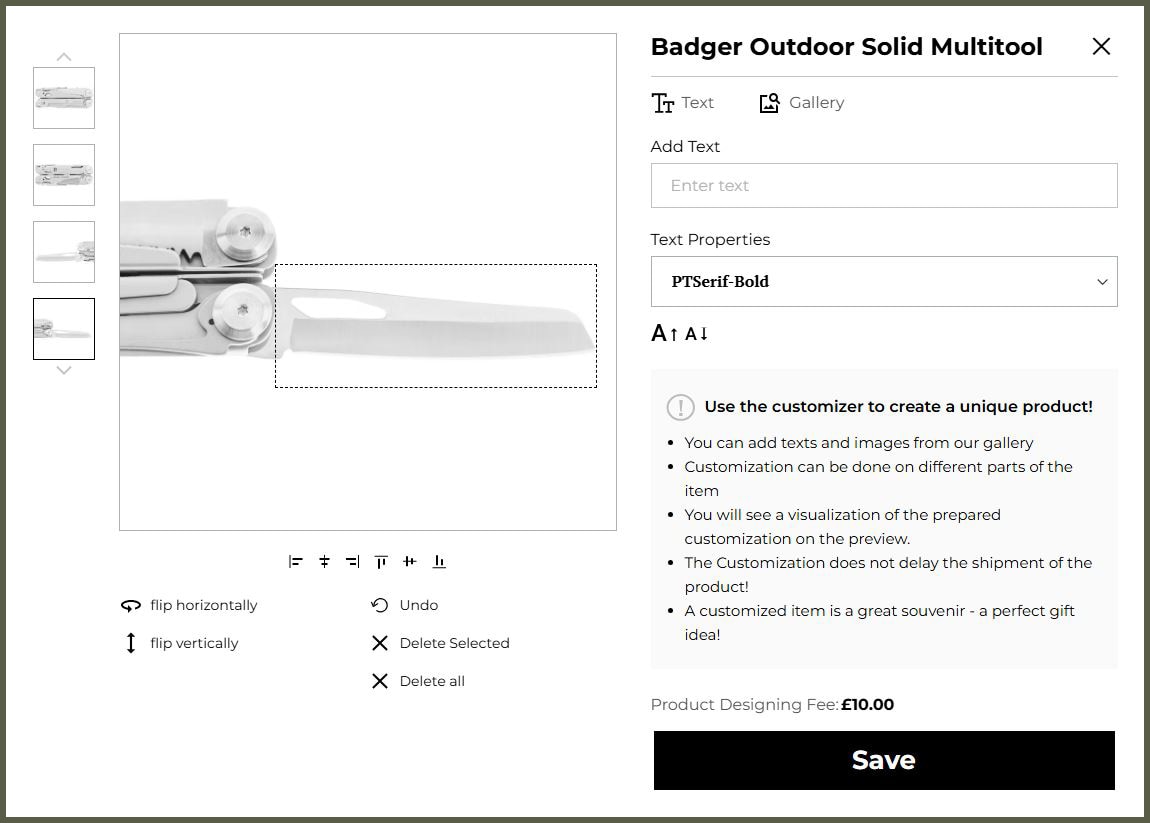
- In the customizer, you can:
- add text (up to 100 characters),
- select a font, change the size, rotate and move the text,
- add graphics from the gallery and edit them in the same way as text,
- place elements in the available engraving fields (1 to 4, depending on the product).
- When the design is ready, click SAVE. Then return to the product card, click ADD TO CART and complete your order. The customization cost will be added in the cart.
How to place an order with customisation?
- Select a product marked with the CUSTOMISATION tag.
- Click CUSTOMISE and create your design in the customiser.
- Click SAVE to save your engraving design.
- After saving your design, return to the product page and click ADD TO CART.
- The customisation cost will be added to your cart before you finalise your order.
- Complete your order as usual — select delivery, payment and confirm your purchase.
 What are the limitations of customization?
- You can add up to 4 elements to one work field.
- Each inscription can have a maximum of 100 characters.
- Elements that extend beyond the work area are automatically adjusted to fit within the engraving area.
- The preview in the creator is illustrative - the laser engraves with much greater precision.
- The color of the engraving depends on the material (e.g., it is light on black metal and gray on steel).
 What do I need to know before placing an order?
- Remember to always click SAVE - without this, the design will not be completed.
- Simply clicking SAVE saves the engraving design, but does not add the product to your cart.
- The customization cost will be added in the cart and will be visible before you place your order.
- There may be slight differences in the final product (fractions of a millimeter).
- If the element looks “pixelated” in the preview, this is normal - the engraving will be sharp and legible.
- Engraving does not delay the shipment of the product.
- Personalized products are not shipped cash on delivery (cash on delivery is not available).
- In case of doubt, our customer service department may contact you to ensure that the design is executed according to your expectations.
 FAQ
FAQ
After saving the project, does the product automatically go to the cart?
No. You still need to click ADD TO CART on the product card after saving the design.
Where will I see the cost of customisation?
The customisation cost will be added and shown in the cart before you place your order.
Does customisation extend the shipping time?
No, making an engraving does not delay the shipping of the product.
